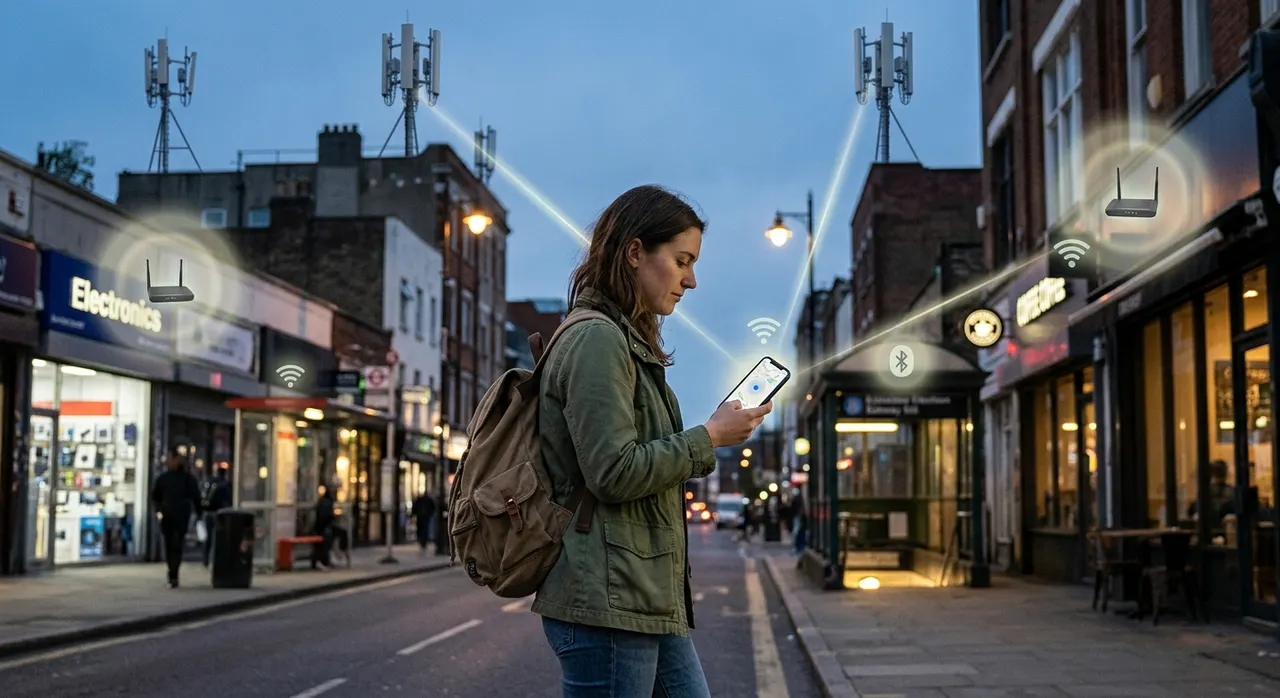
You turn off GPS because you don't want your phone tracking your location. A few minutes later, you open an app and somehow it still seems to know where you are.
So what happened?
Did your phone ignore the GPS setting?
Not exactly.
The confusing part is that GPS is only one of several ways your phone can work out where you are. Even with GPS turned off, your phone may still be able to estimate your location using nearby Wi-Fi networks, mobile phone towers, Bluetooth devices, and other information.
Your phone isn't necessarily getting one perfect location from one system. It's piecing together clues.
GPS isn't the only way to find your location
GPS works by receiving signals from satellites orbiting Earth. Your phone uses the timing of those signals to calculate where you are.
But your phone has plenty of other connections around it.
You're probably surrounded by Wi-Fi networks. You're connected to a mobile network. There may be Bluetooth devices nearby. Your phone also knows things such as the network you're connected to and, depending on your settings and permissions, information from apps and services you've used.
Those clues can be enough to estimate your location.
That's why turning off GPS doesn't necessarily make your phone completely unaware of where you are.
Wi-Fi can give away your location surprisingly well
This is one of the biggest reasons.
Imagine you're sitting in a coffee shop. Your phone can see several Wi-Fi networks around you, even if you aren't connected to all of them.
A location service can compare those networks with a database of known Wi-Fi access points.
If a particular Wi-Fi router is known to be at a certain address, detecting it gives the system a pretty good idea of where you are.
Your phone doesn't have to connect to the network for this to be useful. Simply detecting nearby networks can provide location clues, depending on the device, operating system, settings, and services involved.
This can be especially useful indoors, where satellite signals may be weaker.
Mobile towers can narrow things down too
Your phone is constantly communicating with the cellular network so that you can make calls, send messages, and use mobile data.
That means the network knows which cell towers your phone is communicating with.
If your phone is connected to a particular tower, the network can make an estimate of where you are based on that tower's location and other network information.
With multiple towers and additional measurements, the estimate can become more precise.
It isn't the same thing as GPS. A cell tower doesn't normally tell the network your exact position just because your phone is connected to it.
But it can still provide a useful location estimate.
In a rural area with fewer towers, the estimate might cover a much larger area. In a densely populated city with lots of network infrastructure, there can be more information available.
Bluetooth can help too
Bluetooth is another possible clue.
Think about places such as airports, shopping centres, museums, and stores. Some locations use Bluetooth beacons or other nearby devices to help determine where a device is.
If your phone can detect a known Bluetooth signal, that can provide another indication of where you are.
Again, this doesn't mean your phone is secretly using Bluetooth to pinpoint you everywhere you go. Whether this information is actually used depends on the device, apps, permissions, and services involved.
The important point is that GPS isn't the only radio technology your phone has available.
Your phone can combine all of these clues
This is where location becomes much more interesting.
Instead of relying on one system, a phone can combine different sources of information.
GPS might say you're somewhere within a certain area.
Nearby Wi-Fi networks might suggest you're inside a particular building.
Cellular information might place you in the surrounding neighbourhood.
Bluetooth signals might provide another clue.
The phone or a location service can then use these signals together to produce a location estimate.
It's a little like figuring out where someone is by looking at several clues instead of asking them directly.
One clue might be vague.
Five clues pointing to the same place are much more useful.
What happens when you turn off Location Services?
This is an important distinction because people often use "GPS off" and "location off" to mean the same thing.
They're not necessarily the same setting.
On many phones, there are controls for location services that determine whether apps and system features can access location information. There may also be separate settings controlling things such as Wi-Fi scanning, Bluetooth scanning, precise location, or individual app permissions.
So if your goal is to stop apps from accessing your location, simply switching off GPS may not be equivalent to turning off location access entirely.
And even then, some information about your approximate location can sometimes be inferred from other things.
For example, an IP address can provide a rough idea of the network or region you're connecting from. That's not GPS, and it usually isn't precise enough to tell someone exactly which room you're sitting in, but it can still reveal a general area.
What about airplane mode?
Airplane mode is a more aggressive switch than turning GPS off.
When you enable it, the phone shuts down its radios: the mobile connection, Wi-Fi, and Bluetooth. That removes the signals behind the location methods described above. With no mobile connection, the network can't see which tower your phone is near. With Wi-Fi and Bluetooth off, the phone stops scanning for nearby networks and beacons.
So for the everyday location methods that depend on radio connections, airplane mode genuinely closes the door — much more than turning GPS off does.
A few details are worth knowing, though.
GPS itself works differently from the other systems. The GPS receiver in your phone only listens to signals from satellites; it doesn't transmit anything back to them. That's why a GPS receiver can still be used in airplane mode — for example, a map app with offline maps can often keep showing your position on a hike with no signal at all. But with the phone's radios switched off, there is no internet connection through which that position could be reported to anyone.
Airplane mode also isn't a permanent state of invisibility. Many phones let you re-enable Wi-Fi or Bluetooth individually while airplane mode is on, and the moment you turn airplane mode off entirely, every radio comes back and normal location estimation resumes.
And airplane mode only affects the phone's own live connections. It doesn't reach backwards in time. A location an app recorded before you enabled it, or a photo that uploads once you reconnect, already exists.
So the honest answer: airplane mode is the closest thing to going quiet that a normal phone offers — considerably more effective than switching off GPS — but it's a state you enter and leave, and everything resumes the moment the radios do.
Does this mean your phone always knows exactly where you are?
No.
This is where the subject can get exaggerated.
Turning off GPS does not mean your phone suddenly has perfect secret access to your exact location.
Different location methods have different levels of accuracy.
GPS can often provide a relatively precise outdoor location.
Cellular positioning may only narrow you down to a broader area.
Wi-Fi can sometimes be remarkably useful when known networks are nearby.
An IP address may only reveal a rough region.
The accuracy also depends on your phone, operating system, network, surroundings, available signals, and the services trying to determine your location.
So your phone might know you're somewhere in a particular neighbourhood without knowing which building you're inside.
And there's another important distinction
Your phone knowing something about your location and an app being allowed to see that location are two different things.
An operating system may have access to various signals and information that individual apps don't automatically receive.
Apps generally need permission to access certain types of location information, and modern phones give you controls over those permissions.
That's why it's worth checking which apps have location access rather than assuming that turning off one setting handles everything.
If an app doesn't need your location, you can usually change its permission in your phone's settings.
You can also review whether apps are allowed to use your precise location or only an approximate one, depending on your device.
So why does your phone still seem to know where you are?
Because GPS was never the whole story.
Your phone is a small computer with several radios, sensors, network connections, and software services working together. GPS is just one source of location information.
When it's unavailable, other signals can sometimes fill in some of the gaps.
That doesn't mean your phone can magically determine your exact position whenever it wants. It means there are several different ways of estimating location, and turning off one of them doesn't automatically disable all the others.
The next time you turn off GPS and an app still seems to know you're nearby, the explanation may be much less mysterious than it first appears.
Your phone probably didn't find another satellite.
It found another clue.