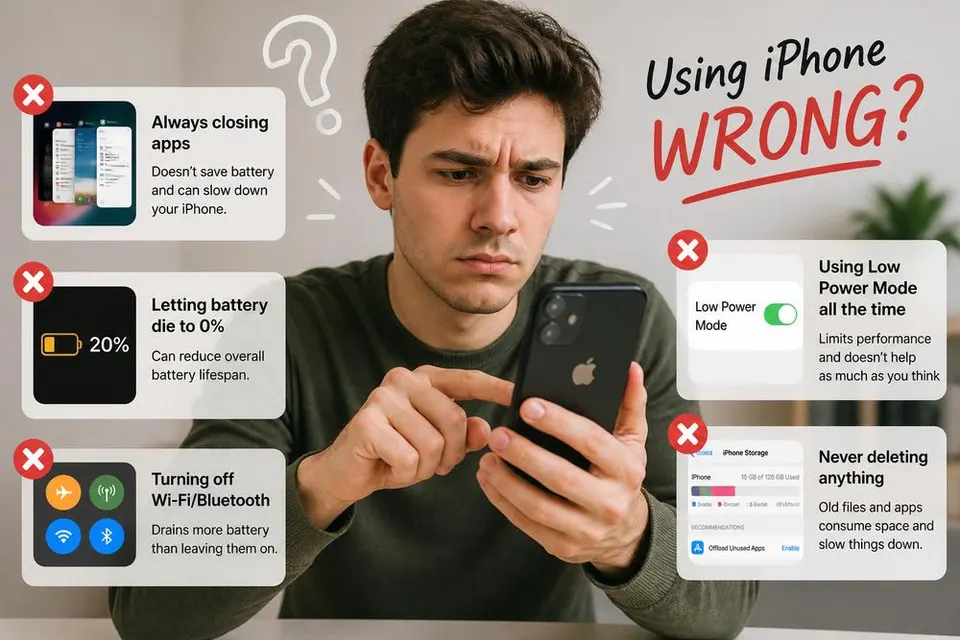
The internet is full of advice that sounds reasonable until you stop and think about it.
closing background apps to save battery.
Turn on dark mode and your phone will last much longer.
Put a wet phone in rice.
Use incognito mode if you don't want anyone tracking you.
Some of these tips have been repeated for so many years that they've become accepted as facts. The problem is that technology changes. Phone batteries change. Operating systems change. Internet services change.
Advice that was useful ten years ago can become outdated, and sometimes a popular tip was never particularly accurate in the first place.
To find out which claims still hold up, we looked at eight of the internet's most common tech myths and compared them against how modern devices and services actually work.
Some of them contain a grain of truth.
Others are almost completely misunderstood.
Myth 1: Does Closing Background Apps Actually Save Battery?
This is probably one of the most common smartphone habits in the world.
Many people regularly open the app switcher and swipe away every app they can see because it feels like cleaning up clutter. The assumption is simple: fewer apps running must mean less battery usage.
That sounds logical, but modern smartphones don't work the way many people think they do.
On both iPhone and Android, an app that disappears from your screen doesn't necessarily keep running at full power in the background. In most cases, the operating system quickly places inactive apps into a suspended state. The app remains stored in memory so it can reopen quickly, but it is no longer actively using significant processing power.
In other words, an app sitting in the background often isn't doing very much at all.
This creates an unexpected situation. When you force-close an app and open it again later, your phone has to reload the entire application from scratch. That process can sometimes use more power than simply leaving the suspended app alone.
Apple has even stated that force-closing apps generally isn't necessary unless an app becomes unresponsive.
That doesn't mean background apps never affect battery life.
Some applications are specifically designed to continue working when you're not actively using them. Navigation apps may track location. Music apps may stream audio. Messaging apps check for notifications. Fitness apps may monitor movement.
Those activities can consume battery power because they're performing real work.
The important distinction is that battery drain usually comes from what an app is doing, not from the fact that it appears in the app switcher.
People also often confuse RAM usage with battery usage. An app occupying memory is not automatically draining power. Modern operating systems are designed to manage memory efficiently. If your phone needs more memory, it can free resources automatically without requiring you to manually close everything yourself.
Another reason this myth survives is because people often notice temporary improvements after clearing apps. The improvement isn't necessarily caused by closing apps. Restarting activity, freeing a misbehaving application, or simply using the phone differently afterward can create the impression that the cleanup worked.
So should you ever close apps?
Yes.
If an app is frozen, crashing, overheating your phone, constantly using location services, playing audio unexpectedly, or behaving strangely, force-closing it can help.
But as a daily battery-saving ritual, repeatedly swiping away every app on your phone usually provides little benefit and can sometimes be counterproductive.
The practical takeaway is surprisingly simple: let your phone manage background apps unless a specific app is causing a problem.
Myth 2: Does Dark Mode Actually Save Battery?
Dark mode has become one of the most popular features in modern technology.
Many people switch to it because they prefer the appearance. Others use it because they've heard it can dramatically improve battery life.
The answer depends entirely on the type of screen your device uses.
This is where a lot of confusion starts.
On older LCD screens, every pixel is illuminated by a backlight. Even if the screen displays a black image, the backlight remains active behind it. The display simply blocks some of that light from reaching your eyes.
Because the backlight remains on, showing black instead of white doesn't produce dramatic power savings.
OLED displays work differently.
Instead of relying on a single backlight, each individual pixel creates its own light. A bright white pixel requires energy. A completely black pixel can simply turn off.
When large portions of the screen become black, power consumption drops.
That's why dark mode can reduce battery usage on OLED devices.
The next question people usually ask is how much battery it actually saves.
The answer depends heavily on how you use your phone.
If your screen brightness is low and your apps don't display large bright areas, the difference may be fairly small.
If you're using high brightness and spending hours in apps with large white interfaces, dark mode can produce noticeably better battery life.
Some tests have shown meaningful improvements on OLED devices, especially at higher brightness levels.
But there are limits.
Dark mode isn't a magical battery-saving switch that suddenly gives you several extra hours of usage regardless of circumstances.
Your display is only one part of battery consumption. Mobile data, gaming, video recording, GPS navigation, camera usage, and background activity can easily consume far more power than interface colors.
There's also a common belief that dark mode is always better for your eyes.
That's not necessarily true either.
Many people find dark mode more comfortable in dark environments, but some users find light text on dark backgrounds harder to read for extended periods. Comfort often depends on lighting conditions and personal preference.
So is dark mode worth using?
If your device has an OLED display and you like the appearance, you may see genuine battery savings.
If your device uses an LCD display, the battery benefit is often much smaller than people expect.
The myth isn't completely wrong.
It's just missing an important detail: the screen technology matters as much as the setting itself.
Myth 3: Does Putting a Wet Phone in Rice Actually Save It?
This is one of the oldest tech-myth rituals on the internet.
Somebody drops their phone in a sink, pool, or puddle. The first instinct isn't always to look up a real drying strategy. It's to run and grab a bowl of rice.
The idea is simple enough: the rice will absorb the moisture and rescue the phone.
The reality is messier, and not in the phone's favor.
Rice is not a magic water-removal system. It can absorb some moisture in the immediate area, but it is a poor drying agent compared to what a phone actually needs when liquid gets into its electronics. The real issues are not just surface water on the outside of the case. They are moisture inside the device, around ports, under seals, and in contact with components that should stay dry.
Putting a wet phone in rice also tends to encourage a delay. A person who spends hours burying a phone in a bowl may be ignoring the most useful immediate steps: removing as much water as possible, disconnecting power, and getting the device into a drier environment right away. That delay can matter more than the rice itself.
There is also the particle problem. Rice dust and starch can end up inside openings, speakers, and ports. In other words, a "rescue" container can add its own kind of contamination.
If the phone was submerged or exposed to salt water, sugary drinks, or anything other than plain water, the situation is even worse. Those liquids can leave residue behind even after they evaporate, and that residue can keep damaging a device long after the visible moisture is gone.
Modern phones are often more resistant to splashes and accidental drops in water than earlier generations, but that protection is not the same thing as being waterproof in every situation. Ratings on packaging usually describe controlled conditions, not a phone that has been soaking in a toilet, a lake, or a washing machine. Even a well-rated device can still be damaged by water under the wrong circumstances.
So what actually helps more than rice?
The most sensible general approach is usually to power the device off, avoid charging it until the ports are fully dry, remove any accessories that trap moisture, and let it sit in a dry environment with airflow. A sealed container with desiccant can be better than rice in some cases, but even then the best move is often to treat liquid damage as serious and not pretend a household pantry can undo it.
The myth persists because it feels proactive. If you do something immediately, you probably saved the phone, right?
Maybe. But the thing that actually improved the phone's chances might have been the time passing and the device drying, not the bowl of rice.
Rice is not useless in every sense. It is just not the reliable tech myth rescue method people imagine.
Myth 4: Does Airplane Mode Actually Charge Your Phone Faster?
This is one of those tips that has been floating around for years.
Your battery is nearly empty. You need to leave the house in twenty minutes. Someone tells you to switch on Airplane Mode before plugging your phone in because it will charge much faster.
Unlike many internet myths, this one isn't completely wrong.
The problem is that people often exaggerate how much difference it makes.
Why Airplane Mode Can Speed Up Charging
When your phone is turned on normally, it's constantly doing work in the background.
It's searching for cellular towers.
Checking for text messages.
Maintaining Wi-Fi connections.
Updating apps.
Syncing email accounts.
Downloading notifications.
Checking your location.
Even when you're not actively using the phone, dozens of small processes continue running.
All of those activities require power.
When you enable Airplane Mode, most wireless communications stop.
The phone no longer needs to maintain cellular connections, search for towers, or constantly exchange data with networks.
Since the phone is using less power, more of the electricity coming from the charger can go toward charging the battery.
The result is usually faster charging.
How Much Faster?
This is where the myth often becomes misleading.
Some people talk about Airplane Mode as though it magically doubles charging speed.
That's rarely true.
The actual difference depends on several factors:
- Your phone model
- Signal strength
- Charger quality
- Battery health
- Background activity
- Whether the screen is on
If you're in an area with weak cellular reception, Airplane Mode may help more because phones use extra power when struggling to maintain a signal.
If you're already connected to a powerful fast charger, the difference may be relatively small.
In many real-world situations, Airplane Mode might shave several minutes off a charging session rather than completely transforming it.
Is Turning the Phone Off Even Better?
Usually, yes.
A powered-off phone uses almost no energy.
Since virtually all incoming power goes directly into charging the battery, charging is often slightly faster when the phone is completely turned off.
That said, modern smartphones are already quite efficient.
The difference between Airplane Mode and fully powered off may not be dramatic for many users.
Why Doesn't Everyone Use Airplane Mode While Charging?
Because most people still want their phone to function.
Airplane Mode blocks calls, texts, and mobile data.
For many people, that's inconvenient.
If you're charging overnight, it may not matter.
If you're waiting for an important call, it probably does.
Does Airplane Mode Help Battery Health?
Not really.
This myth often gets mixed with battery health discussions.
Airplane Mode can reduce battery drain while it's active, but it doesn't significantly extend the long-term lifespan of the battery.
Battery aging is influenced much more by factors such as:
- Heat
- Charging habits
- Age
- Number of charge cycles
- Extreme battery levels
Using Airplane Mode occasionally won't meaningfully change those factors.
What About Fast Charging?
Fast charging technology has a much larger impact than Airplane Mode.
A modern fast charger can dramatically increase charging speed compared to an older charger.
If you're trying to charge faster, upgrading from a slow charger to an appropriate fast charger usually makes a bigger difference than enabling Airplane Mode.
The Verdict
Mostly true.
Airplane Mode can help your phone charge faster because the phone uses less power while charging.
The improvement is real, but it's usually modest rather than dramatic.
If you're in a hurry and every minute counts, it's worth doing.
If you're expecting your charging speed to double, you'll probably be disappointed.
Myth 5: Do Free VPNs Actually Protect Your Privacy?
VPN advertisements are everywhere.
Watch a YouTube video, browse social media, or search for privacy advice and you'll quickly find companies promising anonymity, security, and protection from online tracking.
Then you discover dozens of free VPNs claiming to offer the same benefits without costing anything.
That naturally raises a question.
If paid VPN companies charge money to run their services, how can free VPNs afford to give everything away?
The answer matters because it gets to the heart of whether a free VPN is actually protecting your privacy.
What Does a VPN Actually Do?
A VPN, or Virtual Private Network, creates an encrypted connection between your device and a VPN server.
Instead of your internet provider seeing every website you visit directly, your traffic first travels through the VPN.
This can provide several benefits:
- Encryption on public Wi-Fi
- Hiding your IP address from websites
- Reducing visibility for your internet provider
- Accessing content through different locations
Those benefits are real.
But none of them automatically guarantee privacy.
The Common Misunderstanding
Many people think a VPN makes them invisible online.
It doesn't.
A VPN changes who can see your activity.
Without a VPN, your internet provider can often see more of your browsing activity.
With a VPN, you're trusting the VPN company instead.
That means choosing the VPN provider becomes extremely important.
Why Running a VPN Is Expensive
VPN companies operate large networks of servers around the world.
They pay for:
- Data centers
- Bandwidth
- Hardware
- Security systems
- Software development
- Customer support
- Maintenance
Those costs don't disappear simply because a service is free.
The company still needs revenue from somewhere.
How Some Free VPNs Make Money
This is where privacy concerns begin.
Different free VPNs use different business models.
Some free VPN providers:
- Display advertisements
- Collect usage data
- Sell analytics information
- Limit speeds and encourage upgrades
- Restrict data usage
Not every free VPN is dangerous, but some have been criticized over the years for collecting far more user data than privacy-focused customers expected.
A service cannot simultaneously know everything about your activity and claim complete privacy protection.
Are All Free VPNs Bad?
No.
That's an oversimplification.
Several reputable VPN companies offer free tiers that are supported by their paid products.
In these cases, the free version functions more like a limited trial.
You may receive:
- Lower speeds
- Data caps
- Fewer server locations
- Reduced features
The company hopes you'll eventually upgrade.
That's very different from a random free VPN app that appears overnight with no clear explanation of how it operates.
Can a Free VPN Be Worse Than No VPN?
In some situations, yes.
If a VPN company collects extensive user information, injects advertising, or operates with poor security practices, you may simply be transferring trust from one organization to another without gaining meaningful privacy.
The entire point of using a VPN is trust.
If the provider isn't trustworthy, the VPN itself becomes part of the problem.
What Should You Look For?
When evaluating any VPN, free or paid, consider:
- Transparency about data collection
- Independent security audits
- Clear privacy policies
- Company reputation
- History of security incidents
- How the company makes money
The business model matters.
If you can't understand how the company supports itself, that's worth investigating.
Can a VPN Stop Tracking Completely?
No.
This is one of the biggest misconceptions online.
A VPN doesn't automatically stop:
- Website tracking
- Browser fingerprinting
- Cookies
- Account-based tracking
- Data collection by platforms you're logged into
If you're logged into a social media account, that platform still knows you're using it.
A VPN doesn't erase your identity from services you've voluntarily signed into.
The Verdict
Partly true, depending on the provider.
A trustworthy free VPN can improve privacy in specific situations, especially on public Wi-Fi or when hiding your IP address.
But "free VPN" and "privacy protection" are not automatically the same thing.
Some free VPNs genuinely provide useful protection.
Others make money in ways that create the very privacy concerns people were trying to avoid.
The safest approach isn't to ask whether a VPN is free or paid.
It's to ask who operates it, how it makes money, and what information it's collecting from you.
Myth 6: Does Incognito Mode Actually Hide What You Do Online?
A surprising number of people believe Incognito Mode is a private browsing shield that makes their internet activity invisible.
The name probably deserves some blame.
"Incognito" sounds a lot more powerful than what the feature actually does.
When people discover what it really does, they're often disappointed.
Not because the feature is useless.
Because they've been expecting it to do something it was never designed to do.
What Incognito Mode Actually Does
When you open an Incognito window, your browser creates a temporary browsing session.
Once that session ends, the browser typically stops storing:
- Browsing history
- Search history within the browser
- Cookies from that session
- Temporary site data
- Form information
That's genuinely useful.
If multiple people use the same device, Incognito Mode can prevent your browsing activity from appearing in the normal browser history.
It can also help when testing websites, logging into multiple accounts, or avoiding temporary cookie conflicts.
What Incognito Mode Does Not Do
This is where most misunderstandings begin.
Incognito Mode does not hide your activity from:
- Internet service providers
- Employers
- Schools
- Network administrators
- Websites you visit
- Search engines
- Government agencies with legal access
- The apps and accounts you're logged into
If you're connected to a work network, your employer may still see traffic flowing through that network.
If you're connected to your home internet, your ISP can still see that you're accessing websites.
Incognito Mode mainly changes what gets stored on your device.
It doesn't make internet traffic disappear.
Why People Get Confused
The browser window looks different.
The logo changes.
A warning appears.
The word "private" often appears somewhere in the explanation.
Many users naturally assume this means their activity becomes hidden from everyone.
What it really means is that the browser itself won't save certain local records after the session ends.
That's a much narrower promise.
Can Websites Still Track You?
Yes.
Websites can still collect information while you're actively using them.
They can still see:
- Your IP address
- Device information
- Browser details
- Login information
- Activity on their site
If you sign into an account while using Incognito Mode, that service still knows you're signed in.
The browser isn't hiding your identity from the website.
It's simply avoiding storing local history afterward.
Why Incognito Mode Is Still Useful
Once people learn its limitations, they sometimes conclude it's pointless.
That's not true either.
Incognito Mode is excellent for:
- Using a shared computer
- Checking websites without stored cookies
- Logging into multiple accounts
- Preventing local browsing history from being saved
- Testing web pages
- Temporary browsing sessions
It solves a specific problem very well.
The problem just isn't total privacy.
What Should You Use If Privacy Is Your Goal?
That depends on what you're trying to protect.
For stronger privacy, people often combine:
- Secure browsers
- Privacy-focused search engines
- VPNs
- Tracker-blocking tools
- Good account security
- Encrypted connections
Even then, complete anonymity online is extremely difficult.
The internet wasn't originally designed around privacy.
Most modern privacy tools simply reduce the amount of information being collected rather than eliminating it entirely.
The Biggest Misunderstanding
Incognito Mode isn't lying to you.
Most people simply assume it does more than it claims.
It's a private window for your device, not a cloak of invisibility for the internet.
Once you understand that distinction, the feature makes a lot more sense.
And you'll know exactly when it's useful and when it isn't.
Myth 7: Does Deleting Apps Make Your Phone Faster?
People often talk about smartphones as if they're tiny computers that gradually get "clogged up" over time. One of the most common pieces of advice you'll see online is simple: delete some apps, and your phone will speed up.
It sounds reasonable.
If your phone is slow and you have hundreds of apps installed, surely getting rid of some of them must help.
Sometimes it does.
A lot of the time, it doesn't.
The answer depends on what's actually causing the slowdown.
Why People Believe This Works
The idea comes from how many of us learned to think about computers.
Years ago, a computer packed with unnecessary programs could absolutely feel slower. Programs launched at startup, consumed memory, ran background processes, and filled storage drives.
Smartphones can suffer from some of the same problems, but modern Android and iPhone operating systems are much better at managing resources automatically.
Simply having an app installed isn't necessarily hurting performance.
An app sitting unused on your phone is often doing exactly that.
Sitting there.
Taking up storage space and nothing more.
The real question isn't how many apps you have installed.
It's what those apps are doing.
What Actually Makes Phones Feel Slow?
When people say their phone is slow, they usually mean one of several different things:
- Apps take longer to open
- The keyboard lags
- Animations stutter
- Websites load slowly
- The battery drains quickly
- The phone gets hot
- The camera takes longer to respond
These problems don't all come from the same source.
A phone can have plenty of free storage and still lag because its processor is struggling.
Another phone might have a powerful processor but almost no storage left.
A third phone may be overloaded with background activity.
Deleting apps only helps if those apps are contributing to the specific problem.
Storage Space Matters More Than Most People Realize
One situation where deleting apps genuinely helps is when your storage is nearly full.
Phones need free space to operate efficiently.
That free space is used for temporary files, app updates, cached data, downloads, photos, videos, and system tasks happening behind the scenes.
When storage becomes critically low, strange things start happening.
Apps may crash.
Updates may fail.
Photos may stop saving properly.
The entire phone can begin to feel sluggish.
This is why someone might delete a few large apps and suddenly feel like their phone is faster.
The improvement wasn't necessarily because the apps were removed.
The improvement came from freeing storage space.
If your device constantly warns that storage is full, deleting unused apps can absolutely help.
What About RAM?
Many people confuse storage and RAM.
Storage is long-term space where files and apps live.
RAM is short-term working memory.
When you switch between apps, your phone uses RAM to keep things available quickly.
Years ago, users often manually closed apps because they believed it freed memory and improved speed.
Modern smartphones handle memory management differently.
Android and iOS constantly decide which apps stay active and which ones should be suspended or closed.
In many situations, manually force-closing apps repeatedly can actually reduce efficiency because the phone must fully reload those apps later.
Simply having many installed apps does not mean they're all sitting in RAM consuming resources.
Most aren't.
Can Apps Run in the Background?
Yes.
And this is where deleting apps can make a difference.
Some apps continue doing work after you've stopped actively using them.
Examples include:
- Fitness trackers
- Messaging apps
- Email apps
- Cloud backup services
- Location-sharing apps
- Weather apps
- Social media apps
Background activity isn't automatically bad.
You probably want your messaging app checking for new messages.
You probably want your photo backup service saving pictures.
The issue appears when too many apps are constantly requesting updates, tracking location, refreshing feeds, or sending notifications.
A poorly optimized app can consume battery, data, processing power, and memory.
Deleting that specific app may improve performance.
Deleting random apps usually won't.
Why New Phones Feel Fast Even With Hundreds of Apps
This often confuses people.
Someone buys a brand-new phone, installs 200 apps, and everything runs perfectly.
Then two or three years later, the same phone starts feeling slower.
The obvious assumption is that the app count caused the slowdown.
Usually it's a combination of factors:
The operating system has become more demanding.
Apps themselves have become larger and more complex.
Websites contain more scripts and media than they used to.
The battery may have degraded.
Storage may be nearly full.
The processor is simply older compared to modern hardware.
Deleting apps may help around the edges, but it doesn't magically turn an aging phone into a new one.
Do Preinstalled Apps Slow Your Phone Down?
This is another common question.
Some phones arrive with apps you never asked for.
Games.
Shopping apps.
Manufacturer services.
Carrier software.
People often call these "bloatware."
In some cases, these apps can consume storage and occasionally run background services.
In many cases, however, they remain largely inactive.
Disabling unnecessary preinstalled apps can sometimes free resources, but expectations should be realistic.
Removing three unused shopping apps probably won't transform phone performance overnight.
Why Deleting Social Media Apps Sometimes Feels Like a Huge Upgrade
This is one of the more interesting exceptions.
Apps like Facebook, Instagram, TikTok, Snapchat, and similar services can consume significant resources.
They download media constantly.
They send notifications.
They refresh feeds.
They upload content.
They sometimes track location.
Removing one or more of these apps can noticeably improve battery life and reduce background activity.
The improvement isn't because you removed "an app."
It's because you removed a particularly active app.
What Should You Delete First?
If your goal is better performance, start with:
- Apps you never use
- Apps consuming large amounts of storage
- Apps draining unusual amounts of battery
- Apps running excessive background activity
- Duplicate apps that perform the same function
You don't need five flashlight apps.
You probably don't need three weather apps.
And if there's a game you haven't opened in eighteen months, it's probably safe to remove.
Other Ways to Speed Up a Slow Phone
Deleting apps isn't always the best solution.
Sometimes these steps make a bigger difference:
- Restart the device
- Update the operating system
- Clear unnecessary downloads
- Move photos and videos to cloud storage
- Check battery health
- Remove unused widgets
- Reduce excessive background app refresh
- Free up storage space
If the battery is heavily degraded, replacing it can sometimes make an older phone feel dramatically better because the device is no longer reducing performance to compensate for battery limitations.
So, Does Deleting Apps Make Your Phone Faster?
Sometimes.
But not for the reason most people think.
Phones don't automatically become slower because they contain a large number of installed apps.
They become slower because of storage shortages, aging hardware, degraded batteries, excessive background activity, poorly optimized software, or a combination of those factors.
Deleting unused apps can help if those apps are consuming resources or if you're running out of storage.
If your phone has plenty of free space and those apps aren't actively doing anything, removing them may make almost no difference at all.
The real myth is the idea that app count alone determines performance.
A phone with 300 well-behaved apps can run perfectly smoothly.
A phone with 50 poorly managed apps can feel painfully slow.
What matters is not how many apps are installed.
It's what they're doing after they're installed.
Myth 8: Should You Charge Your Phone to 100% Every Time?
One of the most persistent battery myths on the internet is that your phone should always be charged to 100%.
Another myth claims you should never charge it to 100%.
If you've spent any time reading battery advice online, you've probably seen both arguments presented with complete confidence.
The reality sits somewhere in the middle.
Charging to 100% isn't harmful in the dramatic way many people imagine.
But charging to 100% all the time isn't necessarily ideal either.
Understanding why requires looking at how modern lithium-ion batteries actually work.
The Battery Inside Your Phone Isn't Like Older Rechargeable Batteries
A lot of battery advice still survives from technologies most people no longer use.
Years ago, certain rechargeable batteries developed what became known as a "memory effect."
People were told to fully discharge batteries before recharging them.
That advice largely does not apply to modern lithium-ion batteries.
The battery in your smartphone behaves very differently.
It doesn't need to be trained.
It doesn't need regular deep discharges.
And it doesn't become healthier because you constantly run it down to zero.
In fact, repeated full discharges tend to create more stress, not less.
Why 100% Isn't Really 100%
This surprises many people.
When your phone shows 100%, the battery isn't necessarily operating at its absolute chemical maximum.
Manufacturers build safety margins into charging systems.
They know batteries degrade over time.
They know excessive charging can cause damage.
The software and charging hardware work together to keep everything within safe limits.
So when your phone reaches 100%, it's reaching the limit the manufacturer considers appropriate, not necessarily the battery's theoretical maximum capacity.
Why Battery Experts Often Recommend 20% to 80%
You may have seen advice suggesting that batteries prefer living between roughly 20% and 80%.
There's a reason for that.
Lithium-ion batteries experience less stress when they spend less time at very high or very low charge levels.
The closer a battery stays to the middle of its range, the gentler the conditions tend to be.
This doesn't mean charging to 100% is bad.
It means that constantly holding a battery near 100% for long periods may contribute to slightly faster aging over many months or years.
Battery chemistry is all about small amounts of wear accumulating over time.
Then Why Do Phones Charge to 100% At All?
Because people want maximum battery life during the day.
Most users would rather have a phone that lasts longer between charges.
If charging to 100% gives you more usable battery throughout the day, that benefit is often more important than the relatively small amount of additional long-term wear.
Manufacturers understand this tradeoff.
That's why most phones still allow full charging while also adding features designed to reduce unnecessary battery stress.
What Is Optimized Charging?
Many modern phones now include charging features that learn your habits.
Instead of immediately charging to 100% and sitting there all night, the phone may pause around 80%.
Then it completes the remaining charge shortly before you normally wake up.
The battery spends less time sitting at a full charge while still giving you 100% when you need it.
This approach helps reduce wear without requiring you to think about it.
If your phone offers optimized charging, it's usually worth enabling.
Is Overnight Charging Bad?
Years ago, people worried that leaving a phone plugged in overnight would overcharge the battery.
Modern smartphones don't work that way.
Once the battery reaches its target charge level, charging management systems reduce or stop charging as needed.
Your phone isn't endlessly pumping power into the battery all night.
The larger concern isn't overcharging.
It's heat.
Heat is one of the biggest enemies of lithium-ion battery health.
A phone charging overnight in a cool environment is usually fine.
A phone charging overnight while trapped under blankets or exposed to excessive heat is a different story.
Is Fast Charging Damaging Your Battery?
Fast charging creates more heat than slower charging methods.
Heat contributes to battery wear.
That doesn't mean fast charging is destroying your battery.
Manufacturers design devices specifically to support these charging speeds.
For most users, occasional or even regular fast charging isn't something worth worrying about.
If you want to maximize long-term battery lifespan, slower charging can reduce stress.
For many people, convenience wins that tradeoff.
Should You Avoid Letting the Battery Reach Zero?
Generally, yes.
Lithium-ion batteries prefer not to be completely drained regularly.
Occasional full discharges are not catastrophic.
Doing it every day isn't ideal.
A battery that spends less time near empty tends to age more gracefully over time.
This is one reason many people start charging around 20% rather than waiting until the phone is nearly dead.
Does Charging Multiple Times a Day Damage the Battery?
Not really.
Another old myth suggests that batteries prefer one large charge instead of several smaller charges.
Lithium-ion batteries don't particularly care.
In many situations, shorter top-up charges are actually gentler than repeatedly cycling from 100% all the way down to zero.
Charging from 40% to 70% isn't harmful.
Charging from 60% to 85% isn't harmful.
Modern batteries are designed for this kind of use.
What If You Want Maximum Battery Lifespan?
If your goal is squeezing as many years as possible out of the battery, these habits generally help:
- Avoid extreme heat.
- Avoid leaving the phone in hot cars.
- Don't regularly drain it to zero.
- Use optimized charging features when available.
- Reduce the amount of time spent sitting at 100%.
- Keep the battery in moderate temperature conditions.
Notice what's missing from that list.
Obsessing over every percentage point.
Many people spend more energy worrying about battery health than the battery itself is losing.
So Should You Charge to 100%?
Yes, if you need the extra battery life.
No, if you don't.
That's really the practical answer.
Charging to 100% isn't a battery-killing mistake.
It's simply one end of a tradeoff.
You get more runtime today, while accepting a small amount of additional long-term battery wear over the life of the device.
For most people, using the phone conveniently matters more than chasing perfect battery preservation.
Your battery is a consumable component. It will age no matter what you do.
The goal isn't to freeze that process forever.
It's to avoid the habits that accelerate it unnecessarily while still enjoying the device you bought.