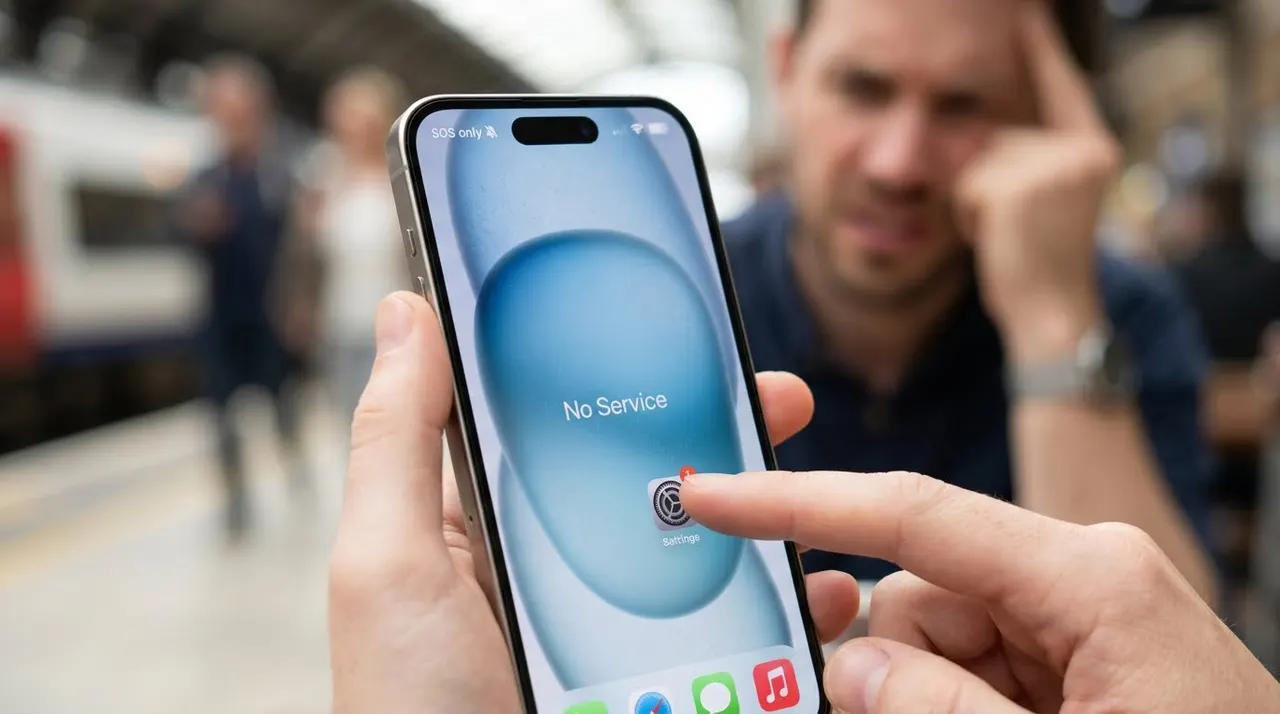
You glance at your phone and something has changed.
Where the signal bars used to be, there's now a small word: SOS. Or maybe "SOS Only," depending on your device.
It looks ominous. Some people assume their phone is somehow dialing emergency services by itself, or that it has broken. Neither is true.
Here's the short answer first: SOS means your phone has lost its connection to your own carrier's network, but it can still reach any other carrier's network for the sole purpose of making an emergency call.
Your phone isn't calling anyone. It isn't broken in the dramatic sense. It's telling you that normal calls, texts, and mobile data are unavailable right now, while the emergency path remains open.
Everything below explains why that state exists, what causes it, what still works and what doesn't, and how to figure out which part of the chain is actually failing.
What SOS actually means
Mobile networks and phones negotiate a connection in stages. When everything is normal, your phone attaches to your carrier, registers you as a subscriber, and gives you full service: calls, texts, and data.
When your phone can't complete that normal registration — because your carrier's signal is too weak where you are, because the network itself is having problems, or because something on the phone or SIM is blocking registration — it drops into a limited-service state.
In that state, your phone does one specific thing: it keeps looking for any network that will accept it for emergency calls.
That's what the indicator is reporting. Apple describes "SOS" or "SOS only" in the status bar as a state in which your device can still make emergency calls; "No Service" and "Searching" are the related states where your device has no cellular connection at all.
So the word on your screen is closer to a status light than an alarm. It says: I can't do normal service right now, but the emergency path still works.
SOS does not mean your phone is calling emergency services
This is the most common fear, and it's worth killing immediately.
The indicator is a network state, not an action. Your phone is not dialing anyone, and nobody has been contacted. No call is being placed until you physically tap the phone or keypad and dial.
There is one related feature that does place calls, and it's easy to confuse with the indicator: emergency shortcuts like pressing and holding the side buttons on an iPhone, or dedicated emergency gestures on Android. Those features exist on any phone, with or without the SOS indicator showing. The label in the status bar and the emergency-call feature are two separate things that happen to share a name.
If you see "SOS" in the corner of your screen, nothing is being called. If you want to verify your phone is idle, open the Phone app and check the Recents list. Nothing will be there.
Why emergency calls still work when nothing else does
The reason emergency calling survives in this state is regulatory, and it's one of the genuinely clever pieces of the mobile system.
Regulators such as the FCC require carriers to route 911 calls to emergency centers regardless of whether the caller subscribes to that carrier's service. In practice, when your phone can't reach your own carrier, it will attach to any compatible network within range — including a competitor's — strictly for the emergency call.
That's why the status bar can say "SOS" while the emergency dialer still connects: your phone is borrowing whatever radio signal exists nearby and asking it to do exactly one job.
A few practical consequences follow from this:
- An emergency call can succeed in places where your own carrier has no coverage but another carrier does.
- It can also fail in genuinely remote areas where no compatible network is within range at all — borrowed or otherwise.
- When your location can't be determined, the call may connect without accurate location data, so knowing and describing your surroundings matters in a real emergency.
The borrowed path is deliberately narrow. It exists so that a person in trouble is never cut off from help just because of a business relationship between two companies. It does not exist to carry your photos, your group chats, or your navigation.
SOS vs No Service vs Emergency Calls Only
Different phones and carriers label the same underlying state differently, and the labels are genuinely useful once you know how to read them.
| What you see | What it means | Emergency calls | Normal calls, texts, data |
|---|---|---|---|
| SOS / SOS Only (typical iPhone wording) | Registered for emergency calls only; not connected to your carrier for normal service | Available | Unavailable |
| Emergency Calls Only (typical Android wording) | The same limited-service state, described differently | Available | Unavailable |
| No Service | The phone reports no usable network connection | May still be possible from the keypad in many regions, but the phone is not advertising a working emergency attachment | Unavailable |
| Searching… | The phone is actively scanning for networks and hasn't settled on anything | Not guaranteed yet | Unavailable |
Apple's own guidance draws exactly this line: "SOS" and "SOS only" mean emergency calls remain possible, while "No Service" and "Searching" mean the device isn't currently connected to a cellular network.
The practical takeaway: SOS and "Emergency Calls Only" are near-synonyms describing the same limited-service condition, while "No Service" and "Searching" describe states that are one step further from a working connection.
Why iPhone says SOS and Android says Emergency Calls Only
There's no deep technical disagreement here. The underlying radio state is the same; the manufacturers simply chose different words for it.
Apple adopted "SOS" for this state beginning with iOS 16, replacing an older "No Service" presentation on iPhones in the same situation. Android manufacturers continued using the more literal "Emergency Calls Only," which describes the state without the abbreviation.
The abbreviation itself has a long history. SOS was chosen as a distress signal in the early days of radio telegraphy not because it stands for a phrase — it doesn't officially stand for "Save Our Souls" or "Save Our Ship" — but because it's a simple, unmistakable pattern in Morse code that reads the same upside down. Phone manufacturers borrowed the familiar word decades later as a compact label for "this device can still reach emergency help."
So when someone says their iPhone "went into SOS mode," the accurate translation is: their iPhone is showing the limited-service state that Android users have always seen as "Emergency Calls Only."
Can a SIM or eSIM cause SOS?
Yes, and this is one of the most common non-coverage causes.
The SIM — physical or embedded — is what tells the network who you are. If the phone can't read it, or the network can't validate it, the phone can't complete normal registration, and the emergency-only fallback kicks in.
Common SIM-related causes include:
- A physical SIM that has shifted slightly out of its tray or accumulated debris on its contacts.
- A SIM that has been deactivated by the carrier — for example after a billing issue, a plan change, or a report of a lost phone.
- An eSIM profile that failed to activate, was accidentally deleted, or became invalid after a phone transfer.
- A software state where the phone needs the SIM re-registered, which a restart can trigger.
eSIMs deserve a specific note: because an eSIM is a software profile rather than a physical card, it can fail in ways that look identical to coverage problems. If your phone switched to SOS right after a software update, a restore, a carrier change, or moving your number to a new device, the eSIM profile is a prime suspect. Re-adding the eSIM from your carrier — or their app — usually resolves it.
A quick differential test: if a second phone on the same carrier works fine in the same room, coverage is unlikely to be the cause, and your SIM or phone settings move up the suspect list.
Can a carrier outage cause SOS?
Yes. When your carrier's network has an outage — a regional cell site failure, a backbone problem, or a failed software update on the network side — phones in the affected area can't complete normal registration. They drop into limited service while the emergency path remains available through other carriers.
Two details make carrier outages recognizable:
- Other people on the same carrier in the same area report the same problem at the same time, while people on other carriers are fine.
- The problem appears and disappears without any change you made to the phone.
That pattern is what makes someone else's phone in the room a genuinely useful diagnostic. If your phone says SOS and a friend's phone on a different carrier shows full bars in the same spot, either coverage for your specific carrier is bad there or your carrier is having an outage. If your friend is on the same carrier and is also in SOS, an outage or shared coverage gap is far more likely than two broken phones.
Checking your carrier's outage map or status page, or asking in a local community group, usually confirms it within minutes.
Why can SOS appear even though signal bars are visible?
This looks contradictory, but it isn't. Signal bars and service registration measure two different things.
The bars describe the raw radio signal your phone can hear — how strong the transmission from nearby towers is at your location. Registration is the handshake on top of that: your phone announcing itself to the network and the network confirming what services you're allowed.
A phone can hear a strong signal and still fail registration. Some reasons:
- The strong signal belongs to a network your phone can only use for emergency calls.
- The network your phone hears is your carrier's, but the subscriber validation step is failing (a deactivated SIM, a provisioning problem, or an account issue).
- The phone's radio state is stuck after an interrupted network change — a situation a restart can clear.
So bars answer "can I hear anyone?" while SOS answers "did anyone agree to serve me for normal use?" A phone can hear plenty and still be turned away at the door.
Does Airplane Mode fix SOS? (and why restarting does too)
Both toggles work for the same underlying reason: they force the radio to renegotiate its connection with the network from scratch.
A phone's modem keeps a lot of state: which networks it has seen, what it registered as last time, which bands it prefers. Occasionally that state gets stuck — after an interrupted handoff between towers, a patchy coverage area, or a network-side change. When the state is stale, the phone can sit in a failed registration even though the network would accept it.
Airplane mode tears that state down. When you turn it off again, the modem rediscovers networks and attempts a clean registration. Restarting the phone does the same thing more thoroughly, and also reinitializes the SIM.
Neither toggle "repairs" anything in the hardware sense. They just force a fresh attempt — which is why they're always the first two steps in any connectivity fix list, from Apple and Google alike. Apple's own troubleshooting for the SOS state starts with checking coverage and settings and restarting the device before anything more invasive.
The corollary matters for diagnosis: if a restart clears SOS and it stays cleared, the cause was probably a stuck radio state. If SOS returns immediately, the cause is probably something structural — coverage, an outage, a SIM problem, or a setting.
Roaming and international travel
Travel is one of the most common real-world triggers of the SOS state, and it happens for a boring reason: your phone is suddenly asking foreign networks for permission.
At home, your phone registers with your own carrier, who knows your account. Abroad, your phone must be accepted by a foreign network through a roaming agreement with your carrier. If that agreement doesn't cover the network your phone is trying to use, if roaming is disabled on your account, or if your plan simply doesn't include the country you're standing in, normal registration fails — and the phone falls back to emergency-only.
Typical travel-related causes:
- Roaming disabled in the phone's settings (it's off by default on many devices precisely to avoid surprise charges).
- Your plan lacking coverage in the country you're visiting.
- An eSIM or travel SIM that wasn't activated or didn't install correctly.
- The phone still trying to attach to your home carrier's network profile instead of the local one — another case where Airplane Mode cycling helps, by forcing the phone to search for what's actually available.
The emergency-call guarantee is what makes this state tolerable abroad: even a phone with no working roaming agreement can still dial the local emergency number in most countries, because the emergency path doesn't depend on your subscription at all.
Satellite SOS and what it isn't
Some phones can now reach emergency services without any cell tower at all, and it's worth separating this from the status-bar indicator because the two get conflated constantly.
On recent iPhones, Apple offers an Emergency SOS via satellite feature: when no cellular or Wi-Fi coverage exists, the phone can connect to orbiting satellites to contact emergency services or share your location with contacts. On Android, Google has introduced satellite-based SOS messaging on Pixel devices, and Garmin's inReach products have provided dedicated satellite SOS hardware for years.
These are separate systems with separate requirements: specific hardware, specific geographic availability, and — for some services — a subscription. Seeing "SOS" in your status bar does not mean your phone is using satellite messaging, and satellite features generally activate only when no terrestrial network is reachable at all.
The two share the name because they share a purpose — reaching help when normal service is gone — but the status-bar indicator is about the cellular emergency fallback, while satellite SOS is about the no-coverage-at-all case.
What still works (and what doesn't) in SOS
This is the question people actually care about once the panic fades: what can I still do?
| Function | Works in SOS? | Why |
|---|---|---|
| Emergency calls (911/112/999, etc.) | Yes | Regulated emergency routing through any available carrier network |
| Wi-Fi internet | Yes | Wi-Fi is independent of the cellular modem entirely |
| Wi-Fi calling if enabled and configured | Usually yes | It rides your broadband connection, not the cellular network |
| WhatsApp, iMessage, Signal, and other internet messengers | Yes, over Wi-Fi | They are data services; over Wi-Fi they don't touch the cellular network |
| Regular calls and SMS over the cellular network | No | They require the normal registration SOS is telling you is missing |
| Mobile data (4G/5G internet away from Wi-Fi) | No | Same reason — no normal registration, no data service |
| Text-to-911 | Only where the service exists | Availability varies by region and carrier; voice is more universally supported |
The pattern is simple: anything that needs your carrier's normal network stops. Anything that can run over Wi-Fi keeps working, which is why a phone in SOS is often still perfectly usable at home or in a café — it just can't be used as a phone on the move.
And if the Wi-Fi you're leaning on feels slow even with full bars, that has its own explanation — those bars measure your connection to the router, not your internet speed.
How to diagnose what's actually causing it
Most people try one random fix and give up. A short ordered checklist will reliably separate the causes, because each step eliminates a category.
- Check coverage and location. Are you indoors, in a basement, in a rural area, or somewhere you've had weak signal before? Move toward a window or outside. If SOS clears, it was coverage.
- Compare with another phone. A second phone on the same carrier that also shows SOS points to coverage or an outage. A phone on a different carrier with full bars points to your carrier specifically — or your phone.
- Check for an outage. Look at your carrier's status page or outage map, or ask locally. If others report it, wait it out; there's nothing to fix on the phone.
- Cycle Airplane Mode, then restart. This clears stuck radio state and re-registers the SIM. If the problem disappears and stays gone, it was a transient registration issue.
- Check the SIM/eSIM. Reseat a physical SIM in its tray (power off first); verify an eSIM profile is still present and active in settings. If it vanished after an update or device transfer, re-add it from your carrier.
- Check carrier-related settings. Make sure Airplane Mode is genuinely off, roaming is enabled if you're traveling, and no VPN or profile is interfering. Check for a carrier settings update, which phones occasionally prompt for.
- Test the SIM elsewhere. Put your SIM in another phone, or another SIM in yours. If your SIM fails in a known-good phone, the SIM or account is the problem — contact your carrier. If every SIM fails in your phone, the phone is the problem.
- Update the software. Modem firmware and OS bugs have caused SOS states on specific devices and versions; installing pending updates is a legitimate fix, not a formality.
By the end of that list, the cause is usually identified: coverage, outage, SIM, setting, or hardware — in roughly that order of likelihood.
When to contact your carrier (and when to suspect hardware)
Contact the carrier when the checklist points at them: the SIM was deactivated, an eSIM profile is missing or won't activate, an outage was confirmed but persists longer than announced, or your SIM fails in another phone. They can reprovision the SIM, re-push the eSIM, and see account-side problems you can't see from the device.
Suspect hardware when the phone never recovers even with a known-good SIM in a known-good coverage area — or when the SOS state began immediately after a drop or water exposure. At that point, a repair assessment is reasonable; there is no user-serviceable fix for a failed modem.
One special case worth knowing: a phone that is always in SOS regardless of location, SIM, or software state may have been blocklisted on carrier networks — most commonly because it was reported lost or stolen. This mostly affects second-hand phones. If you bought a used phone that has never had service, that's the first thing to check with a carrier.
The bottom line
SOS is your phone's way of saying: I can't reach my own network for normal service, but the emergency path is open through anyone.
It isn't a virus, it isn't your phone secretly calling anyone, and it usually isn't broken hardware. It's coverage, an outage, a SIM hiccup, or a stuck radio state — and the fix list above will tell you which, in about five minutes.
The reason the state exists at all is worth remembering the next time you see it: decades of regulation and engineering went into making sure that a phone which has lost everything can still do the one thing that matters most.